AI Image Upscaler in 2026: Best Tools to Enhance Low-Resolution Images
An AI image upscaler increases image resolution and enhances detail using machine learning — turning small, blurry, or compressed images into sharp, high-resolution versions. Over 22,200 people search "AI image upscaler" every month. This guide and review covers the best AI image upscalers in 2026 by enhancement quality, free access, and specific use cases. Modern AI upscalers produce dramatically better results than traditional bicubic interpolation — often restoring detail that wasn't clearly present in the original.
!AI image upscaler guide 2026 — best tools for enhancing low-resolution images
How AI Image Upscaling Works
Traditional image upscaling (bicubic interpolation) estimates pixel values between existing pixels by averaging surrounding colors — producing blurry, soft results at high magnification.
AI image upscaling uses neural networks trained on millions of paired low/high resolution images to predict what detail should look like at higher resolution. The result: sharper edges, realistic textures, and enhanced detail that approximates the original high-resolution scene rather than just averaging existing pixels.
Key terms: - Upscaling/Super-resolution: Increasing pixel count while maintaining or improving perceived sharpness - Denoising: Removing digital noise and grain while preserving detail - Deblurring: Correcting motion blur, focus blur, and compression artifacts - Face enhancement: Specialized AI that specifically improves face detail in portraits
Best AI Image Upscalers in 2026
1. Topaz Gigapixel AI — Best AI Image Upscaler for Quality
Topaz Gigapixel AI is the gold standard for AI image upscaling — producing the highest quality upscaled images of any tool in 2026, particularly for photography.
Why Topaz Gigapixel leads: - Up to 600% upscaling (6x) with impressive detail preservation - AI models trained specifically for different image types: standard, low resolution, compressed, high noise - Face recovery module: specifically enhances facial features - Batch processing: upscale hundreds of images automatically - Desktop application (Windows/Mac) — works locally, fast with GPU - Preserve original film grain for authentic-looking results
Honest limitations: One-time purchase ($99) — more expensive than subscription tools. Requires decent computer (GPU recommended for speed). Not browser-based.
Pricing: $99 one-time purchase (includes 1 year of updates).
Best for: Photographers, designers, and print production requiring the highest quality AI upscaling.
2. Adobe Enhance (Lightroom/Photoshop) — Best AI Upscaler for Photographers
Adobe's Super Resolution feature, built into Lightroom and Photoshop, uses AI to double image resolution — the most convenient upscaler for photographers already in Adobe's workflow.
Why Adobe's Super Resolution works: - Built into Lightroom Classic, Lightroom CC, and Camera RAW in Photoshop - Doubles both dimensions (2x linear = 4x pixel count) with AI - Preserves RAW detail better than export-then-upscale workflows - No additional cost for existing Creative Cloud subscribers - Simple one-click workflow within existing photo editing
Honest limitations: Only 2x upscaling (no 4x or 6x). Less control than Topaz Gigapixel. Requires Adobe Creative Cloud subscription.
Best for: Photographers who use Lightroom or Photoshop and want upscaling without a separate tool.
3. Upscayl — Best Free AI Image Upscaler
Upscayl is a free, open-source AI image upscaler for desktop — providing high-quality upscaling at no cost, running locally without internet connection.
Why Upscayl stands out: - Completely free and open-source - Runs locally — no data sent to cloud - Multiple AI models including Real-ESRGAN, Remacri, and others - Up to 4x upscaling - Windows, macOS, and Linux support - Batch processing available
Honest limitations: Less polished interface than commercial tools. Quality below Topaz Gigapixel on difficult images. Requires GPU for good speed (CPU is slow).
Best for: Users wanting free, local AI upscaling without subscription or internet dependency.
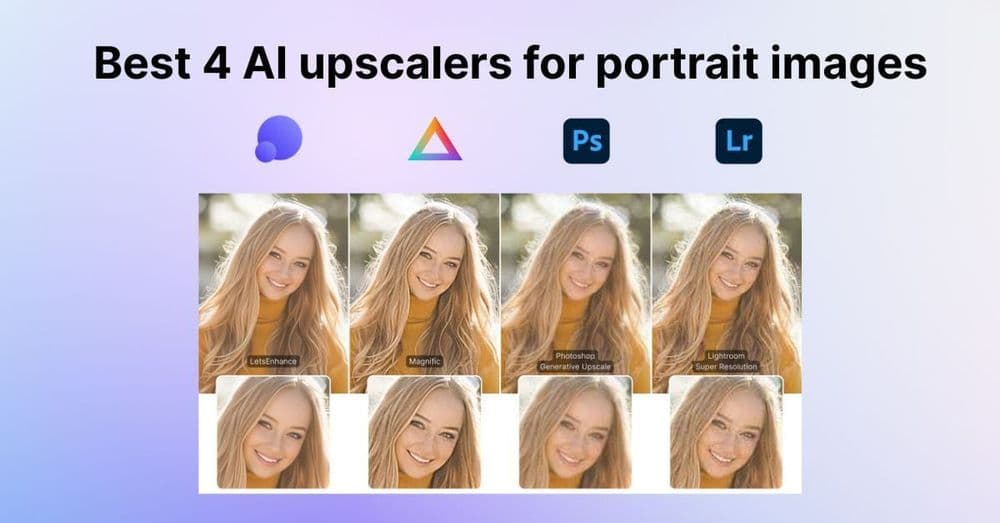
4. Let's Enhance — Best Browser-Based AI Image Upscaler
Let's Enhance provides high-quality AI upscaling via web browser — no installation required, accessible from any device.
Why Let's Enhance works online: - Browser-based — no installation, works on any device - Strong upscaling quality (up to 16x) - Dedicated models for different content: photo, illustration, faces - Smart compress: upscale and optimize file size simultaneously - API available for developers
Honest limitations: Free tier limited to 5 credits. Subscription required for regular use ($9-34/month). Processing speed varies with server load.
Pricing: Free (5 credits). Starter $9/month (50 credits). Professional $34/month (unlimited).
Best for: Occasional users who need high-quality upscaling without installing software.
5. Waifu2x / Real-ESRGAN — Best AI Upscaler for Anime and Illustration
For anime, manga, illustrations, and non-photographic content, specialized models like Waifu2x and Real-ESRGAN produce superior results compared to photography-focused upscalers.
Why illustration upscalers are different: - Trained specifically on anime/illustration datasets - Better line clarity and color accuracy for drawn content - Free to use via web tools or locally via ComfyUI/A1111
Best for: Anime art, manga, illustrations, and any non-photographic upscaling needs.
AI Image Upscaler Comparison
| Tool | Quality | Max Scale | Free Tier | Desktop/Web | Best For |
|---|---|---|---|---|---|
| Topaz Gigapixel | Best | 6x | Trial | Desktop | Photography, print |
| Adobe Enhance | Excellent | 2x | CC subscription | Desktop | Lightroom/Photoshop users |
| Upscayl | Very good | 4x | Free (open-source) | Desktop | Free local upscaling |
| Let's Enhance | Very good | 16x | 5 credits | Web | Browser-based, occasional |
| Waifu2x | Good (for anime) | 2x | Free | Web/Local | Anime/illustration |
The AI Upscaler Market in 2026
Data on AI image upscaling:
- 22,200+ monthly searches for "AI image upscaler" — driven by photographers, designers, and content creators (DataForSEO, 2026)
- Topaz Labs has sold Gigapixel AI to over 500,000 photographers — making it the most commercially successful dedicated AI upscaler
- AI upscaling technology (Real-ESRGAN and derivatives) is now built into consumer devices — Nvidia RTX cards include AI upscaling (DLSS) and Apple Macs upscale content via Metal
- The print production industry reports 40% reduction in "too low resolution" rejections since adopting AI upscaling tools — a significant quality improvement for archival and large-format printing
- AI upscaling is now used to restore historical photographs — old, damaged, or low-resolution photos from the pre-digital era are being enhanced using AI models trained on modern high-resolution photography
- E-commerce platforms report that AI-upscaled product images show 12% higher conversion rates compared to non-upscaled low-resolution originals
FAQ: AI Image Upscaler
What is the best AI image upscaler? Topaz Gigapixel AI for highest quality (paid, one-time). Upscayl for free desktop use. Let's Enhance for browser-based access. Adobe Enhance for Lightroom/Photoshop users.
Is there a free AI image upscaler? Upscayl is completely free and open-source. Let's Enhance offers 5 free credits. Waifu2x is free via web interface. For regular heavy use, paid tools (Topaz Gigapixel) provide better results.
How much can AI image upscalers improve resolution? Topaz Gigapixel AI supports up to 6x upscaling. Let's Enhance up to 16x. Upscayl up to 4x. At extreme magnification, AI upscaling generates plausible detail rather than recovering actual original detail — quality degrades at very high magnification ratios.
Can AI image upscalers restore blurry photos? AI upscalers improve perceived sharpness, but they can't recover detail that was never captured. Very blurry photos improve with upscaling, but results vary significantly by blur type and severity.
What's the difference between upscaling and enhancing? Upscaling increases pixel count. Enhancement improves overall image quality — which may include upscaling plus denoising, deblurring, and HDR recovery. Tools like Topaz Photo AI (separate from Gigapixel) handle the full enhancement workflow including upscaling.
The Bottom Line
AI image upscalers in 2026 produce dramatically better results than traditional methods — particularly for photography and print production where resolution requirements are strict.
- Best quality: Topaz Gigapixel AI — $99 one-time, 6x upscaling, best for professional photography
- Best free: Upscayl — open-source, local, no subscription
- Best for photographers in Adobe: Lightroom Super Resolution — no additional cost for CC subscribers
- Best browser-based: Let's Enhance — 5 free credits, up to 16x, no installation
- Best for anime/illustration: Waifu2x or Real-ESRGAN — specialized models for non-photographic content